




 Ready Enough
Unlock Your Access
First visit only
{{ unlockErr }}
Your code is in your welcome email.
Trouble getting in? hello@jilliancarpenter.com
By entering, you agree to the EULA and Terms. Education, not medical advice — see the Disclaimer and Privacy Policy.
Ready Enough
One quick thing before you start
Right now, you’re in a third-party browser (likely connected to Outlook or Gmail). To get the most out of the Ready Enough web app, copy the link below, close this window, and open Safari, Chrome, or your typical browser. Paste and go ☺
You’re ready{{ closingName }}.
You know what matters to you, you know your options, and your plan is ready to go. You are wildly capable.

— Jillian
Paste your backup
Search your inbox for “Ready Enough backup” (it’s from you, to you — use the newest). Open it, select all, copy, and paste below. The app finds the backup inside the email.
{{ restoreStatus }}
Before you start
Everything you write stays on your device — nothing goes to a server. That’s good for privacy, and it means {{ a2hsHabitsIntro }}:
You’re in{{ beatName }}. Let’s get started!
{{ chapVidLabel }}
Welcome Guide
The welcome video, in writing.
Hello
Hi. I’m Jillian. I’m a doula, a childbirth educator, and I’ve spent the last eight years helping families prepare their hearts and minds for the life-changing experience that is birth.
Welcome to Ready Enough. I’m really glad you’re here.
What this is
I’m not exaggerating when I say that it’s taken me over eight years to develop and refine the process you’re about to work through.
While you’ll walk away at the end with a physical “birth plan,” that’s not really the point. The point is the process. You’re going to:
- get clear on what you value,
- understand your options — both medically and experientially, because birth is never JUST a medical event,
- put your priorities in your own words, and
- bring your team along with you.
The paper at the end is your receipt for all of that, and you’ll learn how to use it as a tool for communication, collaboration, and consent.
How it works
You’ll work through six steps, a framework I call the ENGAGE process. You’ll see them listed on your home screen, in order:
- Establish your values
- Name your context
- Grasp your options
- Assemble your plan
- Gather your team
- Exercise your agency
Each step opens with a short video from me — three to eight minutes long — where I frame the concept so you know how to think about each piece. You can skip them. Please don’t. They’re where the “why” lives, and the why is what helps you think on your feet and become a creative problem solver when the labor journey twists and turns.
You can break the steps up and complete a little bit each day, or sit down and knock it all out in a couple of hours. My honest advice: just get it done. I know that for many people, wrapping your mind around birth feels like an insurmountable task. It’s daunting, and it just kind of looms in the back of your mind. Put in 2–3 hours here, and I am confident that you’ll walk away feeling settled, lighter, and confident that you can meet your birth story, however it unfolds.
A tip for your thumbs: on your phone, tap the microphone on your keyboard and talk your answers instead of typing them. It’s faster, and you’ll naturally say more than you’d ever type — which makes for a better plan.
Three things before you start
This is the important part, and I need you to hear me.
Everything you type stays on your device. I’m a doula, not a tech master, and I’m certainly not in a position to be the keeper of your data. That’s great for privacy, but it means a few habits are on you.
1. Make sure you’re in a real browser. If you tapped a link from an email, you’re probably inside your mail app’s built-in browser. Copy the link, open Safari or Chrome from your home screen, paste it in, and go. I know it feels silly because you’re already here, but just trust me on this one.
2. Bookmark it there, so you can get back without digging through your inbox.
3. At the end of every session, back up. On your phone, tap “Email me my backup” on the home screen and hit send. On a computer, tap “Download my backup” and keep the file. If you or your phone ever clears your cache — and iPhones do this on their own sometimes — that email brings everything back in one paste. If there’s no backup, there’s nothing I can recover. So: email yourself. Every time.
What’s on the other side
Here’s what’s waiting for you at the end of this.
Those swirling 2 a.m. thoughts will be on paper instead of circling in your head. You’ll be able to say what you want and why. You’ll walk into your next prenatal knowing exactly what to ask, and you’ll understand how to partner with your provider in shared decision making so that you feel informed, empowered & supported every step of the way.
Go
Much to my dismay, we never have complete control. But we do have agency.
Lock in the basics, start Step One, and give yourself an afternoon.
You’ve got this — and I’ve got you.
Found a bug? Have feedback?
If something’s broken or behaving strangely, email me at hello@jilliancarpenter.com. Want to tell me what helped most and what would help the next person? Share your feedback — two questions, two minutes.
FAQ & Help
Quick answers. If something's not covered here, email me.
Jump to a topic
Nothing matches that — try another word, or email me.
{{ sec.label }}
Did this help?
A sentence or two in your own words goes a long way — especially during the launch period. Constructive feedback is welcome there too.
Share a testimonial →Found a bug?
Something broken or confusing? The button below starts an email with the details I need already filled in.
Report a bug →EULA · Terms · Disclaimer · Privacy
Ready Enough is education, not medical advice. © MSP Doulas LLC
Ready Enough
{{ welcomeLine }}
I’m so glad you’re here.
In a hurry? Tap the gear in the player to speed me up.
Or scroll down to explore first.
Ready Enough
{{ welcomeBackLine }}
In a hurry? Tap the gear in the player to speed me up.

Note: While your answers do save automatically when using the same device and browser, you will not be able to open your answers in any other location. If you’d like to transfer your answers, back them up on one device and restore them on the other.
Important: clearing your cache will delete your saved answers, and some browsers (particularly within iOS) are set to do this periodically. Backing up is highly recommended at the end of each work session to make sure you do not lose your answers. If this happens, I am not able to retrieve them for you, and you’ll need to start fresh.
{{ backupMsg }}
{{ wsTitle }}
In a hurry? Tap the gear in the player to speed me up.
{{ wsHint }}
Selected: {{ valuesCount }} values · Tap everything that resonates. You’ll narrow down next — and you never have to fill a quota.
{{ fld.label }}
Bring the right questions to the appointment
This reads your plan and builds the specific questions only your provider and hospital can answer — with a spot to record each answer during the conversation.
{{ askWorkingMsg }}
{{ askError }}
These come from your plan. AI can make mistakes — please review with your medical provider. They're about how I see hospitals work most of the time, and nothing should be considered individualized medical advice. The goal is to ask better questions and get better answers!
{{ narrowTitle }}
{{ narrowHint }}
Currently keeping {{ narrowCount }} of {{ narrowPool }}. {{ narrowRoom }}
Set aside — tap to bring back
Now it's time to put your own spin on things! I want to know what these values mean for you. The generic definitions are included as inspiration, and you can keep them, tweak them, or throw them out completely. The clearer you are, the more actionable your values will be for your support team.
 Value {{ row.n }}
{{ row.name }}
Value {{ row.n }}
{{ row.name }}
{{ row.def }}
All five defined ✓
Your values are set. Next: your context.
{{ sp.name }}
Pain Medication Preference
Mark where you currently fall:
Birth Option Organizer
{{ backupMsg }}
{{ booResultLine }}
Description{{ r.desc }}
Why parents might choose this{{ r.benefits }}
Why they might not{{ r.risks }}
Experiential Tradeoffs{{ r.tradeoffs }}
Insider Context{{ r.other }}
{{ booTagLine }}
Looking for something specific?
Every option, considered ✓
{{ booReceiptLine }}
Please don’t risk it…
You’ve tagged {{ booTagCount }} options. Back up before you move on.
{{ booCounter }}
The bookmark in the corner marks a “Big Rock”, which is a preference that matters most to you. Big Rocks get top billing on your customized birth plan.
{{ booGroupNote }}
{{ e.listHeader }}
{{ e.title }}
{{ isec.body }}
{{ booSwipeHint }}
{{ booSecCompleteLine }}
{{ pg.label }}
· {{ pi.title }} {{ pi.sec }} {{ pi.star }}
Nothing tagged here yet.
Birth Plan Builder
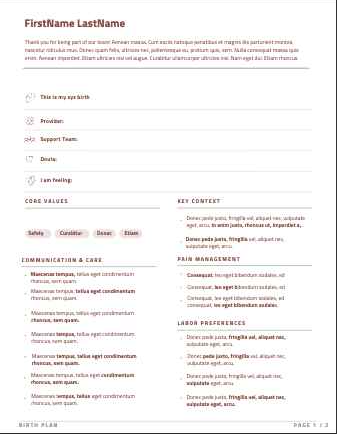
This step turns everything you’ve tagged and written into a customized, designed birth plan — one page, front and back.
Review and edit any of your answers. Then, follow the steps to make selections for your birth plan's design and synthesize your preferences into its contents.
Still tagged "Come Back Later" — these won't appear on the plan
· {{ li.title }}
Now make it look and sound like you.
The bones of the document — how it's laid out and what the type feels like.
How the plan is written. It should sound like you.
How the color shows up on the page.
Pick the hue; the mood you selected above dictates how "loud" it gets.
A photo of you (or your family) on page 1 helps the care team see the people behind the plan.
Now decide what goes in.
The Birth Plan Builder reads everything you've shared, and it shows you how it plans to synthesize everything before writing a word. You clarify anything it got wrong and overrule anything you want done differently. Nothing goes on the page without your say-so.
Nothing is written until you approve — you'll see the proposal first, and clarify or overrule before it writes a word.
AI can make mistakes. Please review with your medical provider.
Regeneration rewrites the whole plan, so any line edits you've made to the current one will be replaced.
{{ genError }}
{{ workingTitle }}
{{ workingMsg }}
{{ workingClock }}
Time to Clarify
{{ pr.kindLabel }}
{{ pr.text }}
Anything else I should know?
Ready Enough
No plan yet!
But that's okay because the true power of a birth plan is not in a piece of paper. It's in the process of creating it. Work through the steps, tag your options, then build.
{{ planStepLine }}
Once you assemble your birth plan, questions specific to you and your preferences will generate here.
Bring the right questions to your next appointment
So much of your plan depends on your provider and your hospital… which monitors they have, what the unit's protocols tie together, what your provider's approach is. This reads your plan and builds the specific questions only they can answer, so you find out now instead of in labor. It explains how hospitals often work; it's not medical advice.
{{ askWorkingMsg }}
This can take a minute — keep the app open.
{{ askError }}
These come from your plan. AI can make mistakes — please review with your medical provider. They're about how I see hospitals work most of the time, and nothing should be considered individualized medical advice. The goal is to ask better questions and get better answers!
After the appointment — how did it go? Your read of the conversation is data too.
{{ editHint }}
Your Birth Plan
This is your plan. Read it slowly.
{{ provenanceLine }}
That was a lot of work. Back it up now so it can’t disappear.
Loading your plan preview…
PDF keeps the full design exactly as you see it here. Word loses some of the formatting, but lets you edit and customize it yourself in docx format.
Same plan, same facts, same bold anchors — only the tone changes. Any lines you’ve edited are re-voiced too, so read it through after.
{{ revoiceErr }}
Did this help?
Real talk: testimonials make a huge difference for digital products like this, and during the launch period, I would be so grateful for your kind or constructive words!If Ready Enough has done something for you — settled a worry, gave you words for a conversation, made the whole thing feel less like a fog — would you say so?
Share a testimonial →Want to change something?
Your PDF downloads exactly as it looks here.
AI can make mistakes. Please review with your medical provider.
{{ fbNote }}
{{ planStepLine }}
© 2026 Jillian Carpenter
for more birth education, support & advocacy
Licensed to {{ licEmail }}